|
ME 405 Portfolio
|


|
|
ME 405 Portfolio
|
|
ME Mechatronics: Microprocessor applications in machine control and product design. Applied electronics. Drive technology; transducers and electromechanical systems. Real-time programming. Mechatronic design methodology. Using a Nucleo L476RG. All doxygen documentation for each lab can be found in the tabs list on the left under Files >> File List
Introduction to Python programming and the documentation process for creating the term portfolios. In this lab we used a finite state machine to create a vending machine which the user could use to enter money, select drinks, and receive their change. Lab1.py (Source: https://bitbucket.org/SubparCoder/subparcode/src/master/Lab1/Lab1.py)
The goal of this lab is to gain experience using external interrupts and the Nucleo microcontroller. We created a game in which the user would be prompted by an LED on the board to press a button on the board as quickly as possible. The LED turns on at a random time, and the users reaction time is measured. When the user decides to stop playing, their reaction times are averaged and presented to them. Lab2.py (Source: https://bitbucket.org/SubparCoder/subparcode/src/master/Lab2/Lab2.py)
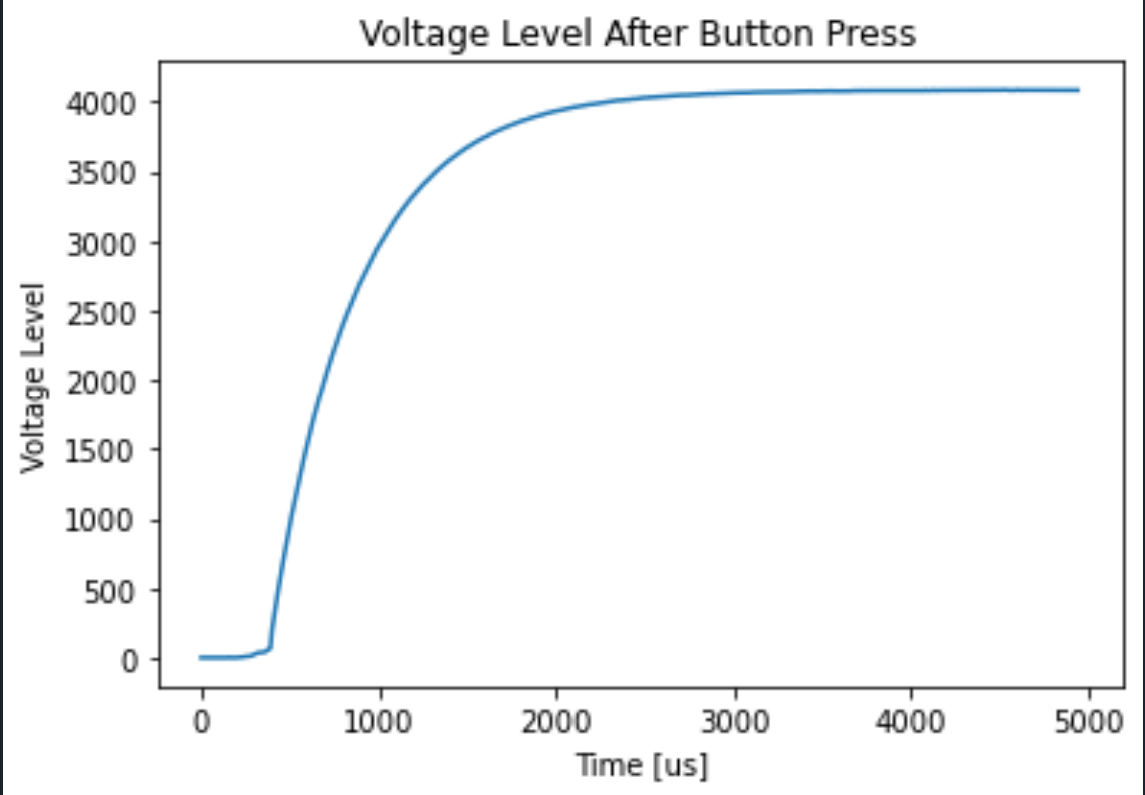
In this lab we used the the blue button on the Nucleo board to measure a step response. The front end (FE) code ran on the computer and prompted the user to press a button and begin the "experiment". The user would press the button would press the blue button on the board, interrupting the voltage supplied to it, and the back end (BE) code running on the microcontroller would measure the step response of the voltage returning to normal. The back end would then send its results to the frend end through serial communication, and the front end code would display the results in the form of a voltage vs time graph. Time is in microseconds and voltage is converted from analog to digital output in the process of pressing the blue button. Lab3fe.py and Lab3be.py (Source: FE https://bitbucket.org/mediocre-code/me-405-lab/src/master/Lab3/Lab3fe.py BE https://bitbucket.org/mediocre-code/me-405-lab/src/master/Lab3/Lab3be.py and txt.csv file example https://bitbucket.org/mediocre-code/me-405-lab/src/master/Lab3/text.csv)
The goal of this lab was to create a class to interface with an I2C device. We used an MCP9808 to take temperatures and plot the results. Lab was done with Hunter Morse (https://dhmorse.bitbucket.io/) Lab4.py, Lab4User.py, and mcp9808.py (Source: https://bitbucket.org/dhmorse/me-405/src/master/Lab04/)
 1.9.0
1.9.0